This blog is to share details about HTTP /1.1 /2 (HTTP /1.1 and HTTP/2 shares same methods but HTTP/2 is connection are use request response multiplexing) Methods which used to fetch or update data on web server.
When you surf website and when you ask for perticular page on website that time, Web browser send HTTP Request Methods to Web Servers. There are mostly 7 used HTTP Request Methods. These 7 Methods area as below
HTTP OPTIONS METHOD/REQUEST

When surf website putting web address then browser start to communication with web server, first it ask which all methods are supported by web server using OPIONS method as shown on image. Here Client(Web browser) send request with OPTIONS method to www.joes-hardware.com . And www.joes-hardware.com reply back with response with supported methods GET, POST, PUT, OPTIONS.
HTTP GET METHOD/REQUEST
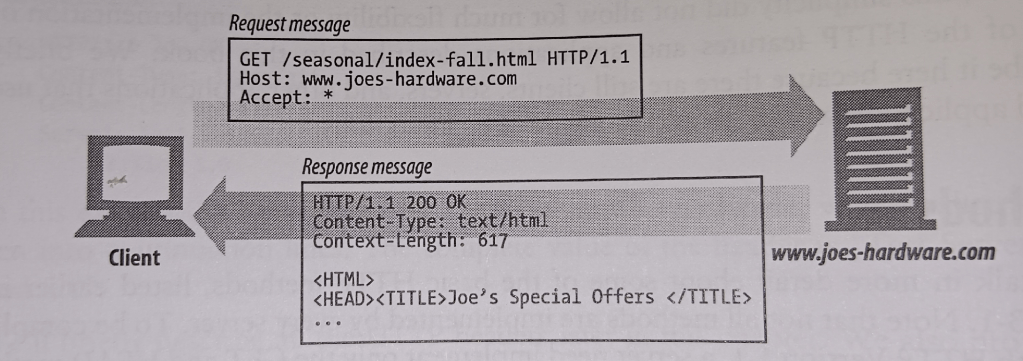
Now When We browse certain link or page on webserver it send GET request to get that page or link from Webserver. Here in image when Client (Browser) ask for URL (web page) www.jeos-hardware.com/seasonal/index-fall.html then Browser create request for GET seasonal/index-fall.html and put Host as www.jeos-hardware.com . Now, Webserver reply with resonse with web page “<HTML><HEAD><TITLE>Jeo’s Special Offer</TITLE> … “
HTTP POST METHOD/REQUEST
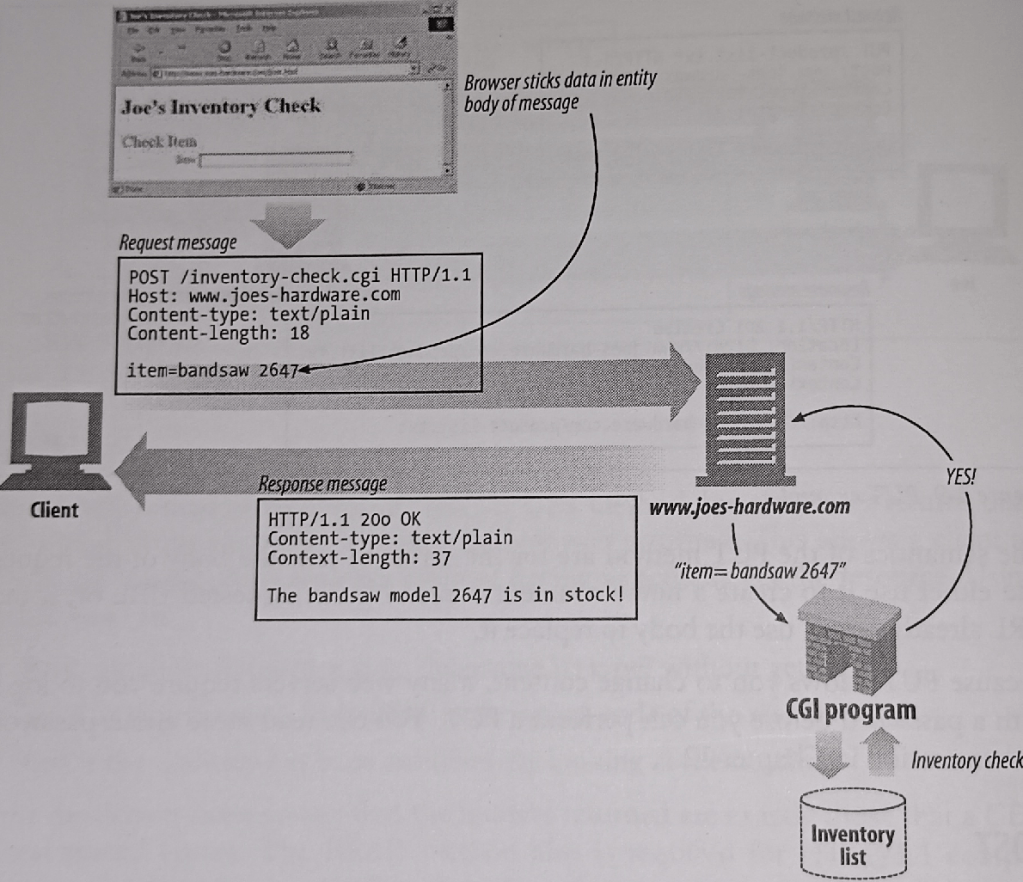
When you submit form on website, it generally use POST Method of Webserver/HTTP to send form details to webserver to store or process form values. POST Method hides parameters/values of form from website address. Here bandsaw value 2647 is requested and webserver response with bandsaw model 2647 is in stock.
In Image browser send POST Request to page joes-hardware.com/inventory-check.cgi with form values item=bandsaw 2647 and Webserver pass values to CGI program inventory-check.cgi which is nothing but web program which run on webserver. This inventory-check.cgi check database Inventory list for availablity of bandsaw type 2647 and reply back to webserver and webserver send reponse to client(web browser)
HTTP PUT METHOD/REQUEST
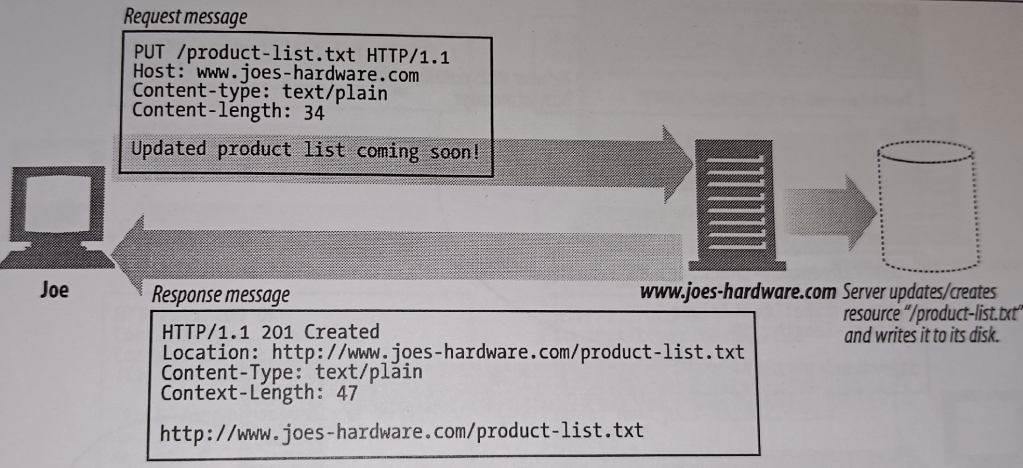
When you want to save/upload file on Webserver that time PUT Method use. Here Joe/Client/Web browser send request to upload file product-list.txt on server using PUT Method. Now, Web server process PUT request and save file on disk and send response to Web browser with confirmation HTTP/1.1 201 Created
HTTP DELETE METHOD/REQUEST
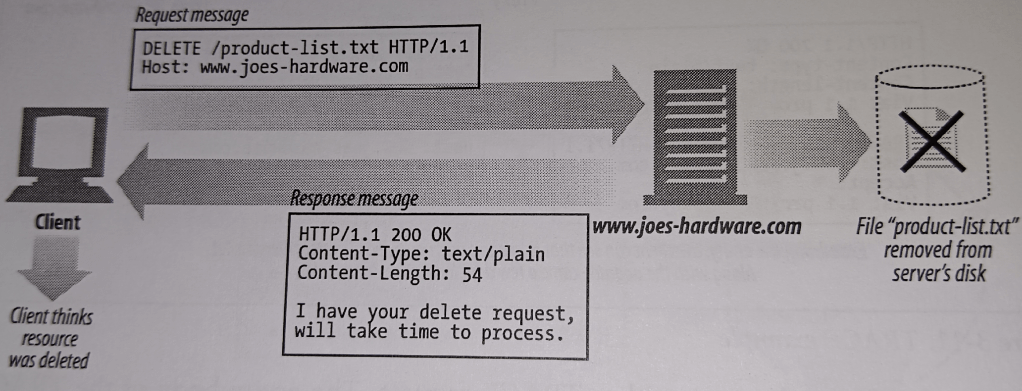
When you want to remove specific file from Webserver, you can send DELETE Method/Request to Webserver specifing file. In real world on some website, you are given option to delete some file which is nothing but delete file with DELETE Method of HTTP Protocol. Here in Image Client(Web Browser) send DELETE request with filename product-list.txt to Webserver www.joes-hardware.com and Webserver process this request and delete file product-list.txt from disk. To confirm delete webserver send response to Web browser with 200 OK reply.
HTTP HEAD METHOD/REQUEST

HTTP HEAD Method/Request is same as GET/POST but its does not send reponse with whole page content which is requested but return whether such page/resource/file available or not. This method also return Webserver banner to know which webserver program is serving web page. Here in image client/Web browser send HEAD request with www.joes-hardware.com/seasonal/index-fall.html to check whether index-fall.html available or not and Webserver reply with 200 OK means index-fall.html is available.
HTTP TRACE METHOD/REQUEST

This method is dangerous and should not enabled on webserver.
This method used to trace proxies between Web browser and Webserver. Here in image Client(Web browser) sends TRACE request to webserver www.joes-hardware.com and there is proxy proxy3.company.com between webserver and web browser which add additional header via 1.1 proxy3.company.com and send it to www.joes-hardware.com . Now when webserver www.joes-hardware.com send response and again it goes to proxy3.company.com and add header via 1.1 proxy3.company.com and send back to Client/Web browser. Now when Client/Web Browser sees this response it understand that there is proxy between which is proxy3.company.com
This method is dangerous because it allows to share infromation about intermediate proxy, web application firewall, etc which can use to target for Web Security Attacks.
If you want to know in-depth about HTTP Protocol then read following book.

 IT Consulting & IT Training
Leave a comment